
Every website needs to factor in web content. People turn to websites for many reasons, like buying or finding information. Therefore, the content presented to the web user is of value the web user will experience during the visit to the site.
Website content varies from information and copywriting published on web pages to blogs, PDFs, adverts, products and campaigns. Looking at web content in more detail, elements such as contact details, addresses, and opening hours can go unnoticed. The ‘barebones’ content is not as elaborate as the more eye-catching content and why it goes under the radar. However, actual content serves a purpose and is vital to all websites. Another less obvious example of webpage content is campaign home pop-ups. Ads fall into the category of website content even though the ad has been put there for specific reasons as ad pop-us.
1 Keyword research.
Keywords are essential to include within the page content, such as page titles, page descriptions, and the main body of text. By having keywords, the relevance of the webpage is identifiable by the search engine. The webpage relevance can then be sent to users whose query is in the keyword context. Keywords are unique because people use different words in search engines as search terms, and these are constantly changing in line with consumer behaviour changes. Therefore, keyword research aims to identify all relevant and potential keywords that share the web site’s context and objectives.
Keywords are seen as the link between the technology website and search engine. For example, website search engine technologies detect the keywords in the writing of the website content and match keywords with the user’s query. So keywords in website content act as signals between the user, search engine and website.
Keyword research identifies all known keywords related to site context and objectives. One of the first tasks would be starting a keywords list of words to use as keywords to include on the website. Concentrating on making long lists through keyword research to ‘mine’ for keywords could help find new, unexpected keywords. But keyword research is more than that. Keyword research is twofold; looking at the trends in broad a sense of search term patterns in consumer behaviour.
Keyword mining will tail off if and when trends in search terms change. The diagram below shows search terms as the top part of the letter T and keyword mining as the bottom part. The diagram describes search terms changing and keyword mining driving from the search term trend to find a variation to the relevant search trend.
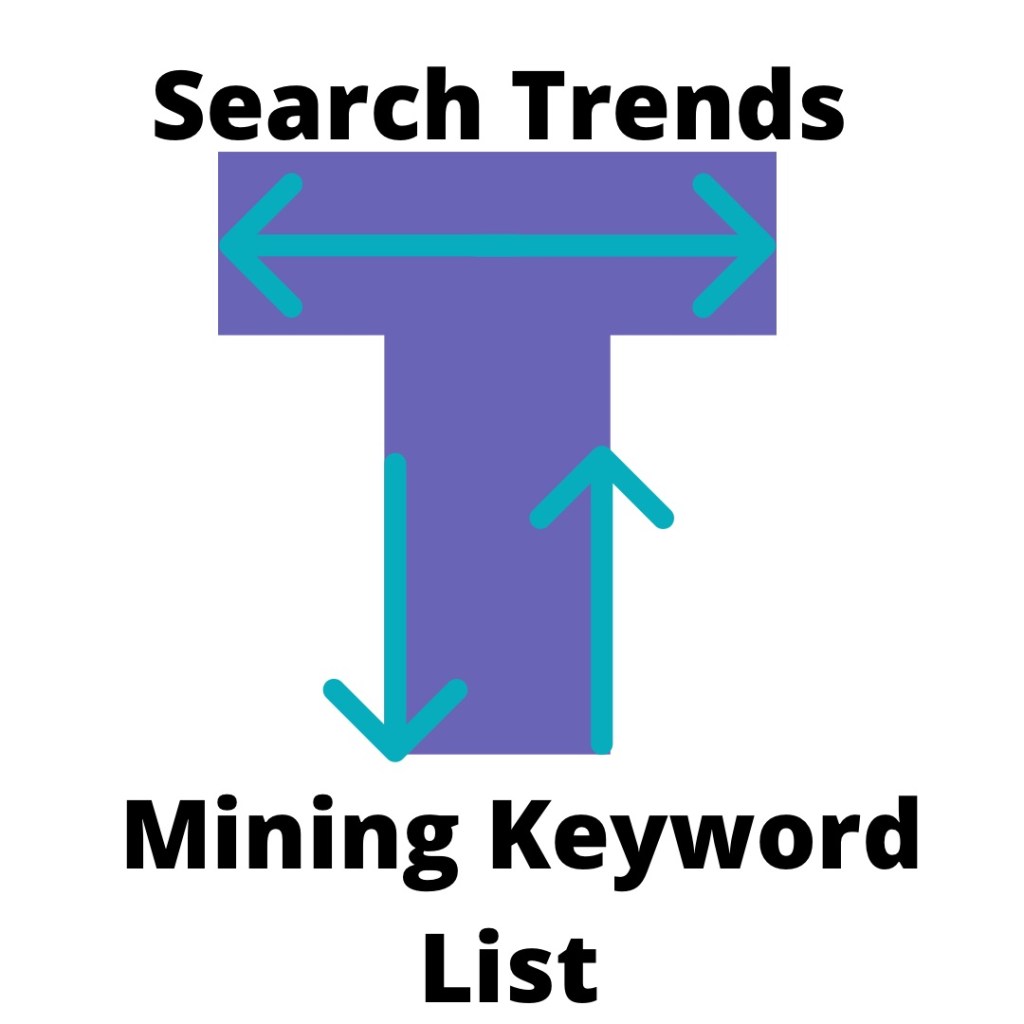
Search trends broken down can mean many factors. For example, are words concatenated more often if short or long phrases in particular contexts. Auditing and reporting search trends for signs of change over time. Best positions the website content if a search trend does change. The website will be able to adjust its keywords if the website understands how people are coming to the site.
Finally, look at the target customers. Are keywords relevant to your target group? For instance, age or any other everyday characteristic. Again, there are many factors to keep an eye on and keep under review for keyword research.
Competitor analysis adds another element to keywords in web content. Competing companies in keywords for products and services should have an understanding of the keyword landscape there are completing. Let’s say, for argument’s sake – industrial cleaning equipment hire.
The reason being the demand for the service is at the regional level due to customer demand. Companies are competing at the regional level because there is no demand at the local level for this service. For example, the business that supplies the industrial cleaning equipment hire has done keyword competitor research and uses very competitive keywords on their website. Therefore, in the context of having niche keywords, it also relates to large geographical areas due to customer demand. As a result of keywords used, the web users will be sent to the website directly, and competitive and relevant keywords in this example will improve the website’s search performance.
The level of competition in the keyword search landscape will reflect the real-world demand. For example, cleaning equipment keywords are competitive—however, keywords for household furniture for e-commerce sites have different business economic sets of curcumsatnces. Therefore, there will be an increase in the competitiveness of keywords compared to the cleaning hire company.
At the local level, keyword competitiveness impacts business competition with another example. In the less competitive business areas, keywords don’t have a significant impact as they do in others keyword landscapes. For instance, if there are only a few car garages in the typical tiny town. Therefore, keywords would not have a significant impact if the number of business listings on that search engine result page was more than the number of car garages in town. However, business demand is reflected in the physical world and could easily fit onto the first page. Keywords In this example, they have no meaningful impact as they would have in more competitive business areas.
Keyword research tools.
Here is a range of popular tools for fundamental research to try out for reference.
· Answer the Public.
· Ubersuggest
· Google analytics
· Google trends
· Keywooddit Keyword surfer (Extension)
· Keywords everywhere (Extension)
Keywords play a big part in web content planning. A website with plentiful keywords is a better site from a humanistic and technological point of view. In addition, putting keywords in all places possible will help the site tremendously rank on Google.
2. Improved titles and heading structure.
Headings are there to give context to the reader. The better the reader can scan the content, the better the title. When a user can browse and understand the content. The article connects well with the reader and is a plus for the content and a user to read the document further. So, what are some best practices for heading writing?
Heading length
Keep the heading length no longer than one sentence long. The heading size can work well If the users can scan the content. A shorter heading may also tempt the users to read further through the content.
Ease of access for users.
Accessibility for users stems from good headings. User assisted by screen readers needs easy to follow understandable titles. Another plus for your article to have.
SEO benefits in using headers.
Standard SEO techniques like plotting keywords into heading and titles. As well as getting user search intent phrases placed within the article titles. This will help Google pull upon relevance from the site within the indexing and ranking from the user’s search.
What is an acceptable way of structuring headings within an article with keywords and phrases?
H1: Impressive places to visit in Cornwall this summer.
H2: Why your family should visit Cornwall.
H3: How best to use your time while visiting.
H3: The amities on offer here in Cornwall.
H3: How to book.
H2: What do other holidaymakers think of Cornwall.
H3: Cornwall has lots to offer for holidaymakers.
H3: Find out more about holidaying in Cornwall.
This example of a heading structure illustrates a mix of H1, H2 and H3 draft outlines in an article.
Headings should not be over complicated. But it is essential to factor in what they bring to your articles, such as context, accessibility, and SEO.
3. Optimised meta descriptions.
Optimising meta description requires less brainpower than first thought through the beauty of Content Management Systems (CMS). All to most websites have a CMS. They take care of the changes made to the webpage behind the scenes. We push the buttons!
Writing meta descriptions for a web page with a CMS is easy. Here is the less techy adapted version for the less techy people.
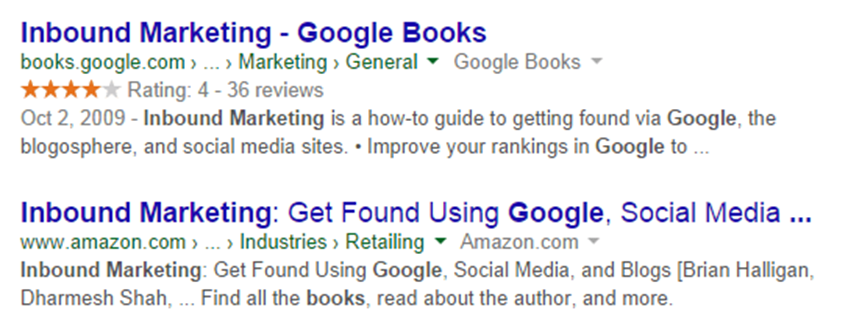
Meta descriptions are small text areas that Google reads to help understand the website and webpage. CMS offers editing capabilities so that writing meta descriptions is effortlessly managed. These are snippets of information in the search results for the web users to understand the website and web page. The web user sees the page title and meta-description, as seen below.

The meta description should follow more or less the example above. The text should fit in the text field of the CMS. If the users can tell there will be value by clicking the link, this is a small win for your site.
The content of the meta-description should contain some persuasive action. For example, adding discounts will give the users an extra reason to click through to the site. There is an element of creativity in the copy used but is constrained in size. For three reasons, one is limited space to write—two give the user easy-to-understand phrases. Three, users have small attention spans when using the web.
Meta descriptions do and don’ts.
Do’s
Please do have varied meta descriptions for sections of the website.
Ensure the reader understands what value they will get. Add any persuasive language and keywords.
Don’ts
Do not use the exact text or duplicate meta descriptions.
Meta descriptions are vital to helping users, and search engines understand the site. Meta descriptions are another way of padding your pages with much content possible for the user’s benefit.
Category pages are at the end of the marketing funnel consumer journey is about interface and experience. Meaning focusing on maintaining the flow of the consumer journey is crucial. So, the user will continue along further the funnel to buy at the transaction stage.
4. Category pages.
Category pages are at the final stages of the marketing funnel and the consumer journey. Therefore, focusing the interface and experience on maintaining the flow of the consumer journey is crucial. So, the user will continue along further the funnel to buy at the transaction stage.
From a web content point of view, the focus of the layout is to support the marketing funnel and sale of the product. Therefore, compliance information, product and purchasing information take up a lot of the page space. Unlike other areas of the consumer journey, compliance and similar information feature a lot on the category pages.
Getting the mix right between the mandatory information needed on the page and supporting the consumer journey is down to the UI/UX of the page. Again, a sense of balance and proportion needs to be visible. For both page areas to work together, the carrier serves its purpose.
The position of the subcategories organises the page for the user. Better organisation of products decreases the touchpoints for users. This creates a better user experience.
Another way of improving UI/UX is to provide two options for users to navigate. By having in place a subfolder structure that allows a brand or item navigation route. The users can then browse through the first touchpoints on the 1st and 2nd levels of the site hierarchy. The benefit of dividing subcategories by item and brands is that users are comfortable navigating a comprehensive navigation route. A clever subfolder structure can add secret value to the site.
Breadcrumbs are a helpful UX/UI feature for websites. They are used as part of the site’s navigation and present an option to point users further into the website during the visit. Additionally, strengthen the site’s internal linking, increasing visibility in search engines. A solid linking structure outlaid on the site, search engines see well managed internal links as more detectable. The benefit of breadcrumbs used as UI/UX contributes to users’ experience with more visits to other site pages. Furthermore, Google will also look for the site breadcrumbs to display for the mobile and desktop versions of the site. Keywords in breadcrumbs will help the click-through rate.
Images used in page headers form additional UI/UX elements to category pages. Of course, the images need to work well for the website’s brand and product. To make this work use high quality, unique and well-formatted images. That fits into the template of the page. In addition, ideas can work well to construct a sensation of amazement for the site.
SEO of category pages
The meta descriptions used for category pages may not have an SEO impact. Google’s way of doing things, the description text can be overridden or created by Google if one does meet googles standard to if one does not exist. In addition, Google already has a good understanding of the semantics of the page from other means. Therefore, Google can provide and input a description by itself. The difference lies that product pages aren’t as influential as parent web pages. Meta descriptions further down the website hierarchy are not as semantic value as the parent pages. Automation can fill in gaps towards the bottom of the website hierarchy.
Matching up user value with basic SEO is vital as always, instead of attempting an SEO magic trick. Stick to writing an average amount of text that suits the web copy standard of 50-200 words on product pages. Copywritten within short and plain sentences. Emotive words can also be included to create an action.
Keywords on category pages are an integral part of SEO from the inbound marketing angle. Keywords in the page heading descriptions are formulaic as any other webpage content SEO.
Outlining the technical aspects of category pages.
This is a quick introduction to the schema mark-up for content management system users.
Schema mark-up is an aspect of web development and is a format of code added to the web pages behind the scenes. Mainly for product pages and hospitality business. The schema code directly informs search engines about the product/web page’s added specific information.
The information inputted into schema can include – average ratings and reviews of the business. For example, the rating information added to the schema mark-up appears on the search results pages. This is the benefit of using schema. In addition, it adds another dimension of content to the webpage to add the keyword and create action from positive reviews.
5. Improved internal links.
Internal links are the ties between the site’s pages. Internal links help package up the site to the users. The site’s architecture can direct the users to specific site pages. For example, through the means, having a well-organised site and adding calls to action required to contact pages.
Internal linking focuses on the pages that work well for the site. The busy links meet the overall objective of the site. Or not what pages are less critical to the site. Depending on the kind of site, this could be obvious. Working on an internal link plan around these points will help user value.
But for sites selling products, it could be less noticeable. eCommerce sites, for example, have specific internal linking of the web pages. As a result, internal linking may look different. Based on the user’s past browsing habits, links could point to recommended product pages.
As already mentioned before, breadcrumb site navigation improves internal linking and product category organisation. Both these recommendations help increase the UI/UX for the users and Google’s general expectations of the site.
Summary
Website content is a part of digital marketing that covers a lot of ground. The background touched in this post doesn’t anywhere near enough to everything about protecting web content. But lays the essential functions to web content. To summarise, content organisation leads to a better website for users. The road map for creating a content website best suited for its users and including Google’s recognition of the site’s content is critical to web content.

 Robert Fogarty